claude-nudge
githubmacOS notification hook for Claude Code CLI — pings you when Claude needs your input
claude-nudge




Never miss a Claude Code permission request or finished task again.
claude-nudgeadds native macOS desktop notifications to the Claude Code CLI using hooks — so you don’t have to babysit the terminal.
- 🔔 Permission requests pop a notification — know the instant approval is needed, without watching the terminal
- ✅ Completed tasks pop a notification — know the instant Claude finishes
- ⚡ One command to install — zero dependencies, zero telemetry, zero network calls
npx claude-nudgemacOS only. (Notifications are delivered via osascript.)
What it looks like
Permission prompt — Sosumi chime, body is 🔔 + the permission message Claude Code sends (e.g. ”🔔 Claude needs your permission”). Fires on the Notification.permission_prompt hook.
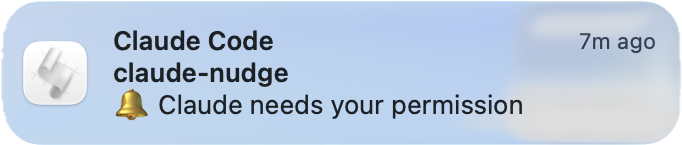
Task complete — Glass chime, body is ✅ Task complete. Fires on the Stop hook when Claude finishes its response.

Both show Claude Code as the title and the current project directory as the subtitle.
Why?
When Claude Code requests permission or finishes a task, the only signal is inside your terminal. If you’re reviewing code in another window, reading docs, grabbing coffee, or waiting out a long-running task, it’s easy to miss — so Claude sits idle waiting on you, or finishes without you noticing.
claude-nudge surfaces those two moments in macOS Notification Center, so you can stay heads-down elsewhere and still react the moment Claude needs you.
Install
npx claude-nudge            # install both hooks
npx claude-nudge --test     # fire a sample notification + grant macOS permission
That’s it. The installer:
- Adds a
Notificationhook (matcherpermission_prompt) and aStophook to~/.claude/settings.json. - Copies the runner to
~/.claude/claude-nudge/notify.js(stable path, survivesnpmcache cleanup). The runner picks the right message + sound based on the hook event it receives. - Backs up your prior
settings.jsonto~/.claude/.claude-nudge-backups/(dir mode0700, backup files0600, 5 most recent kept).
First run: the first notification triggers a one-time macOS permission prompt for your terminal app. Run
npx claude-nudge --testright after installing so it’s granted up front (see Troubleshooting).
How it works
Claude Code event  (permission prompt  /  task complete)
        │  hook fires
        ▼
~/.claude/claude-nudge/notify.js   (picks message + sound for the event)
        │
        ▼
osascript  ──▶  macOS Notification Center
No daemon, no background process — the runner executes only when a hook fires, then exits.
Update
npx caches packages, so npx claude-nudge may run a stale version. Pin @latest to force a fresh fetch and re-copy the runner:
npx claude-nudge@latestThen run npx claude-nudge --doctor to confirm — it reports the installed runner’s version and warns if it’s stale relative to the package, so you can tell at a glance whether the update actually took effect.
Uninstall
npx claude-nudge --uninstall                # fully remove hook + runner + backups
npx claude-nudge --uninstall --keep-backups # keep the backup directory
Commands
| Command | Purpose |
|---|---|
npx claude-nudge | Install both hooks |
npx claude-nudge --test | Fire a sample notification (also triggers the one-time macOS permission prompt) |
npx claude-nudge --doctor | Diagnose install health (platform, settings.json, runner, osascript) |
npx claude-nudge --list-sounds | List the notification sounds available on this Mac |
npx claude-nudge --set-sound NAME | Set the notification sound for all events (also plays a sample); use none to silence |
npx claude-nudge --disable-completion | Stop notifying on task-complete (permission prompts still fire) |
npx claude-nudge --enable-completion | Re-enable the task-complete notification |
npx claude-nudge --dry-run | Show proposed changes without writing anything |
npx claude-nudge --uninstall | Remove both hooks, the runner directory, and claude-nudge’s env keys (CLAUDE_NUDGE_SOUND, CLAUDE_NUDGE_STOP) |
npx claude-nudge --force | Skip the 3-second abort window when replacing an existing foreign permission_prompt hook |
npx claude-nudge --help | Show help |
npx claude-nudge --version | Print version |
What it writes to settings.json
  {
    "statusLine": { ... },
    "permissions": { ... },
+   "hooks": {
+     "Notification": [
+       {
+         "matcher": "permission_prompt",
+         "hooks": [
+           {
+             "type": "command",
+             "command": "/Users/<you>/.claude/claude-nudge/notify.js"
+           }
+         ]
+       }
+     ],
+     "Stop": [
+       {
+         "hooks": [
+           {
+             "type": "command",
+             "command": "/Users/<you>/.claude/claude-nudge/notify.js"
+           }
+         ]
+       }
+     ]
+   }
  }
If you already have other Notification matchers or other Stop hooks, they are preserved. If you already have a permission_prompt entry that isn’t from claude-nudge, the installer warns you and gives a 3-second window to abort (or use --force). Foreign Stop entries are never replaced — claude-nudge simply appends its own alongside them.
Note on the Stop hook
The Stop hook fires at the end of every main-agent turn, so you will get a “Task complete” notification after each response — including short back-and-forth exchanges. If that’s too noisy, turn just that notification off while keeping permission-prompt nudges:
npx claude-nudge --disable-completion   # mutes task-complete; permission prompts still fire
npx claude-nudge --enable-completion    # turn it back on
This sets CLAUDE_NUDGE_STOP=off in the env block; the hook stays installed and the runner simply skips the task-complete event. (You can still fully --uninstall to remove both hooks.)
Customizing the sound
By default, permission prompts play Sosumi and task-complete plays Glass. You can override the sound used for all events with one command:
npx claude-nudge --list-sounds      # see what's available on your Mac
npx claude-nudge --set-sound Hero   # set it (case-insensitive, validated) — also plays a sample
npx claude-nudge --set-sound none   # silence the chime (banner still shows)
npx claude-nudge --test             # hear it — reflects the configured sound
--set-sound plays a sample of the new sound immediately so you can hear the change. --set-sound none (or off/silent/mute) keeps the banner but drops the chime.
--set-sound validates the name against the sounds installed on your Mac and writes a single CLAUDE_NUDGE_SOUND key into the env block of ~/.claude/settings.json:
  {
    "hooks": { ... },
+   "env": {
+     "CLAUDE_NUDGE_SOUND": "Hero"
+   }
  }
Notes:
--list-soundsenumerates the.aiff/.aif/.caffiles in/System/Library/Sounds,/Library/Sounds, and~/Library/Sounds— these are the formats macOS plays for notifications. (Drop your own.aiffin~/Library/Soundsand it shows up;.wav/.mp3are not listed because macOS won’t reliably play them as notification sounds.)--set-soundrejects an unknown name (with a suggestion) so you can’t silently set a sound that won’t play. If you instead hand-editCLAUDE_NUDGE_SOUNDto a name that doesn’t exist, the runner doesn’t error — macOS just falls back to the default alert sound.--testforwards your claude-nudge settings (CLAUDE_NUDGE_SOUND, and the completion toggle) to the runner, so it reflects what you configured — matching what Claude Code does when a real notification fires. (Only claude-nudge’s own keys are forwarded, not the rest of yourenvblock.)CLAUDE_NUDGE_SOUNDis a single override applied to both events, so there’s no sound name that restores the distinct per-event defaults (Sosumi for permission prompts, Glass for task-complete). To go back to those, remove the key — by hand-editingsettings.jsonor via--uninstall(which removes it along with the hooks).- You can also set the variable by hand instead of using
--set-sound; the runner reads it on every notification.
Troubleshooting
No notifications appearing? Run the doctor — it checks platform, settings.json, the runner, and osascript:
npx claude-nudge --doctorDismissed the macOS permission prompt? The first notification asks your terminal (iTerm, Terminal, VS Code, etc.) for Notification permission. If you dismissed it, re-enable via System Settings → Notifications → [your terminal app], then run npx claude-nudge --test.
Ran an update but still on the old version? npx cache. Force a fresh fetch with npx claude-nudge@latest, then verify with npx claude-nudge --doctor.
Too many “Task complete” notifications? The Stop hook fires every turn — mute just that one with npx claude-nudge --disable-completion.
FAQ
Does this send data anywhere? No. Zero network calls, zero telemetry, zero runtime dependencies, zero npm lifecycle scripts. Everything runs locally on your Mac.
Does it work on Windows or Linux? No — macOS only. Notifications are delivered through osascript, which is macOS-specific.
Why do notifications come from “Script Editor”? A macOS limitation, not a bug — osascript notifications are always attributed to Script Editor. See Known limitation below. Don’t click them.
Can I change the sound? Yes — npx claude-nudge --set-sound NAME (or none to silence). See Customizing the sound.
Can I turn off the task-complete notification? Yes — npx claude-nudge --disable-completion. Permission prompts keep firing.
Using Cursor (or another editor that reads Claude Code hooks)? claude-nudge only responds to genuine Claude Code events. Cursor’s hooks service bridges your ~/.claude/settings.json and fires its own lifecycle events (e.g. a lowercase stop) on every agent turn. The runner dispatches only on Claude Code’s exact event names, so those bridged events are ignored — you won’t get a notification (and no spurious “permission required” ping) from Cursor.
Known limitation: notifications attribute to “Script Editor”
Notifications are fired via osascript, which macOS always attributes to Script Editor (the AppleScript host app). Two visible consequences:
- The icon badge on the notification is the Script Editor scroll icon.
- Clicking the notification opens Script Editor with an Untitled document. Don’t click — the notification is purely informational.
This is a macOS platform behavior, not a bug in claude-nudge. The only way to change attribution is to fire notifications via UNUserNotificationCenter from a properly identified app bundle, which requires a notarized native binary — an ad-hoc-signed AppleScript applet (osacompile) is silently rejected by macOS 13+ Notification Center for new bundles, so we keep the osascript path which works out of the box.
Privacy
- ✅ Zero network calls — all processing is local
- ✅ Zero telemetry
- ✅ Zero runtime dependencies
- ✅ Zero npm lifecycle scripts (no
preinstall/postinstall)
The project directory name (the basename of cwd) appears as the notification subtitle. This is visible in macOS notification history and on lock screen. If you work in directories with names you’d rather not display (e.g., ~/Projects/private-project/), adjust lock-screen visibility in System Settings or consider renaming the folder.
Verifying the publish
npm audit signatures claude-nudgeThis package is published with npm provenance — attestations linking the tarball back to the GitHub build that produced it.
Requirements
- macOS (Darwin) — Linux/Windows support not included
- Node.js ≥ 18
- Claude Code CLI installed (duh)
Contributing
See CONTRIBUTING.md. Issues and PRs welcome at aashutosh-prakash/claude-nudge.
Security
See SECURITY.md for disclosure policy and security properties. Report vulnerabilities privately to aashutosh.code@gmail.com.
License
MIT — see LICENSE.
Unofficial, community-maintained. Not affiliated with Anthropic.