sage
githubLightweight Agent Detection & Response (ADR) layer for AI agents — guards commands, files, and web requests. Part of Gen Agent Trust Hub.
Sage

Safety for Agents — Agent Detection & Response for AI coding assistants
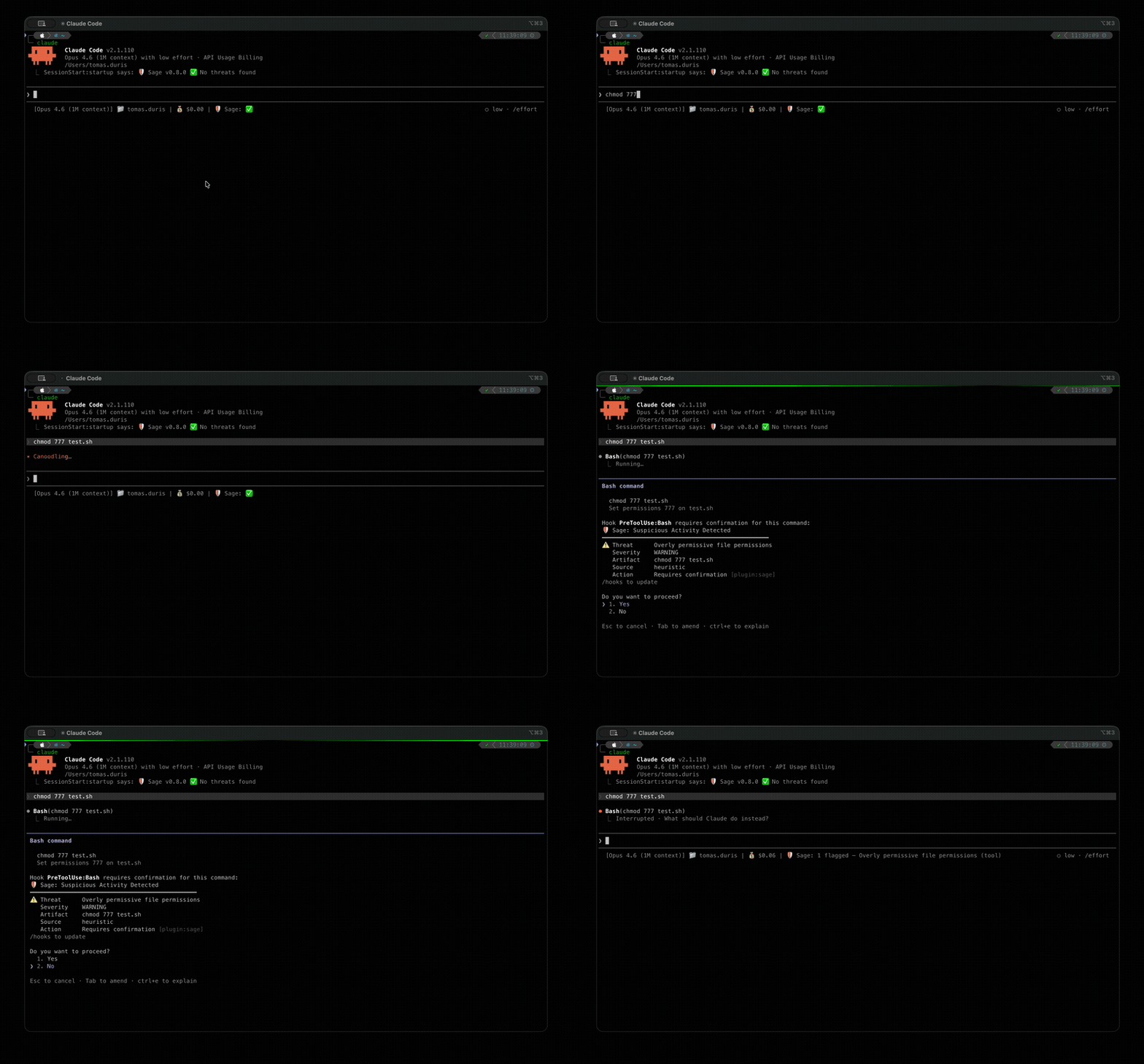
Sage is a lightweight security layer that protects AI agents from executing dangerous actions. It intercepts tool calls — shell commands, URL fetches, file writes — and checks them against multiple threat detection layers before they run.
Note: Sage may appear under a different product name (e.g., Norton Sage, Avast Sage) depending on how it was installed. See Branding for details.
Key Features
- URL reputation — cloud-based detection of malware, phishing, and scam URLs
- Local heuristics — 300+ YAML-based threat patterns for dangerous commands, suspicious URLs, credential exposure, and obfuscation
- Prompt injection detection — two-tier defense (heuristics + fine-tuned ML model) against injected instructions in fetched content. See Prompt Injection
- Package supply-chain checks — registry existence, file reputation, and age analysis for npm/PyPI packages
- Plugin scanning — scans installed plugins for threats at session start
- AMSI integration — Windows Antimalware Scan Interface support (Windows + WSL via PowerShell interop; no-op on macOS and non-WSL Linux)
Quick Start
Visit ai.gendigital.com/sage for the latest installation instructions, or use the platform-specific guides below.
Claude Code — install guide · requires Node.js >= 18
/plugin marketplace add https://github.com/gendigitalinc/sage.git
/plugin install sage@sage
Cursor — install guide · install the Gen Sage extension from the marketplace
VS Code — install guide · install the Gen Sage extension from the marketplace
OpenClaw — install guide · install from npm
openclaw plugins install @gendigital/sage-openclawOpenCode — install from npm by adding to ~/.config/opencode/opencode.json:
{
  "plugin": ["@gendigital/sage-opencode"]
}
See the User Guide for detailed instructions, configuration, and troubleshooting.
Privacy
For privacy considerations, please refer to Privacy.
Documentation
| Document | Description |
|---|---|
| User Guide | Installation, usage, configuration, exceptions, platform guides, privacy, FAQ |
| Developer Guide | Architecture, development setup, testing, threat rule format |
| Prompt Injection | ML + heuristic prompt injection detection |
| Package Protection | npm/PyPI supply-chain checks |
| AMSI Scanning | Windows antimalware scanning via AMSI |
| Plugin Scanning | Session-start plugin scanning |
| Audit Log | On-disk JSONL schema (entries, signals, content) |
| MCP Server | Shared MCP server architecture |
| Decision Pipeline | Signal sources, policy model, evaluation order |
| Branding | Product name configuration |
Contributing
See CONTRIBUTING.md for development setup, coding conventions, and the threat rule contribution process.
License
Copyright 2026 Gen Digital Inc.
- Source code: Apache License 2.0
- Threat detection rules (
threats/): Detection Rule License 1.1